Creating Magical Holiday Motion: A Guide to 3D Santa Sublimation Wind Spinners
The holiday season is a time when creativity meets tradition, and few decorations capture the whimsical spirit of Christmas quite like a wind spinner. Among the most popular trends in DIY holiday crafting is the 3D Santa Sublimation Wind Spinner. This project combines the timeless image of Saint Nick with modern sublimation technology to create a dynamic, eye-catching display that moves with the winter breeze. Whether you are a seasoned crafter looking to expand your product line or a beginner eager to create personalized gifts, understanding the nuances of this specific design format is essential for success.
At its core, this craft involves transferring a high-resolution digital design onto a physical metal surface using heat and pressure. The result is a vibrant, full-color image that becomes part of the material rather than sitting on top of it. When applied to a wind spinner, the imagery gains a new dimension—literally and figuratively—as it spins, creating an illusion of depth and motion that static ornaments cannot achieve.
Understanding the Technology: What is Sublimation?
Before diving into the specifics of the Santa design, it is crucial to understand the mechanism behind the magic: sublimation. Unlike traditional printing methods where ink sits on the surface of paper or fabric, sublimation uses heat to turn solid dye particles directly into gas. This gas then permeates the polymer coating of a substrate, such as a metal wind spinner blade. As the material cools, the dye solidifies, becoming a permanent part of the product.
This process offers several distinct advantages for holiday crafts:
- Durability: Because the ink is embedded within the coating, the design will not peel, crack, or fade easily, even when exposed to outdoor elements like snow and wind.
- Vibrancy: Sublimation allows for photorealistic colors and gradients, which is essential for capturing the detailed features of a 3D Santa illustration.
- Seamless Finish: There is no tactile "layer" of ink; the surface remains smooth to the touch.
For those new to the craft, it is important to note that sublimation only works on materials with a special polymer coating or high polyester content. Standard aluminum or untreated metals will not accept the dye. This is why purchasing blanks specifically labeled as "sublimation ready" is a non-negotiable step in the process.
The Significance of High-Resolution 300 DPI Designs
In the world of digital crafting, resolution is king. When searching for a Christmas 3D Santa wind spinner sublimation design, you will often encounter specifications like "300 DPI" (Dots Per Inch). But why does this number matter so much?
DPI refers to the printing resolution. A file with 300 DPI contains enough data points to produce a sharp, crisp image when printed at its intended size. In contrast, a low-resolution image (such as 72 DPI, which is standard for web browsing) may look acceptable on a computer screen but will appear pixelated, blurry, or blocky when printed on a physical object. Given that a wind spinner is often viewed from various distances and angles while in motion, any lack of clarity in the design can detract significantly from the final aesthetic.
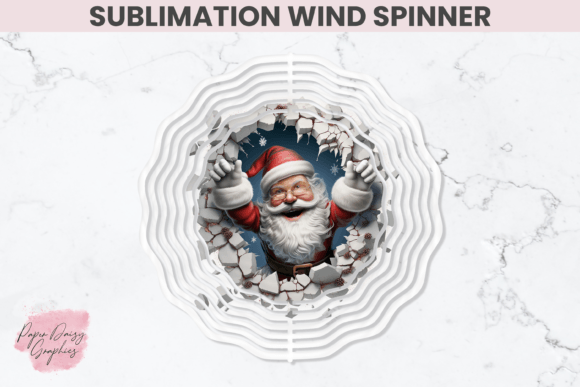
The specific design mentioned in this guide—a 10.5 inch by 10.5 inch sublimation PNG—is optimized for square wind spinner blanks. The 300 DPI resolution ensures that every detail of Santa's beard, the glint in his eyes, and the texture of his suit renders perfectly. This level of detail is what transforms a simple metal sheet into a piece of art.
Practical Application: Working with the 10.5 x 10.5 Template
The dimensions of your design file are just as critical as the resolution. The 10.5″ x 10.5″ square wind spinner template is designed to fit a variety of standard wind spinner blanks available on the market. However, fitting a digital file to a physical object requires precision.
When you purchase an instant digital download zip file containing these designs, you are receiving a versatile asset. Here is how to approach the practical application:
- Verify Your Blank Size: Measure your metal blank before printing. While 10.5 inches is a common standard, slight variations exist between manufacturers. Ensure your blank matches the template dimensions to avoid white edges or cut-off design elements.
- Mirror Your Image: A common mistake among beginners is forgetting to mirror (flip horizontally) the image before printing. Since sublimation transfers the image in reverse, failing to mirror your PNG will result in a backward Santa.
- Secure the Transfer: Use heat-resistant tape to secure the printed sublimation paper tightly against the metal blank. Any gaps can lead to "ghosting," where faint duplicates of the image appear due to paper movement during the press cycle.
- Time and Temperature: Follow the manufacturer's guidelines for your specific blank. Generally, metal sublimation requires high heat (around 380°F - 400°F) for a specific duration (often 45-60 seconds) with medium-to-firm pressure.
Navigating Color Variations and Expectations
One of the most frequent questions in the sublimation community concerns color accuracy. It is vital to manage expectations regarding how colors appear on different devices. As noted in many product descriptions, colors may appear slightly different on various screens and printers.
This discrepancy occurs because computer monitors use RGB (Red, Green, Blue) light to display colors, while printers use CMYK (Cyan, Magenta, Yellow, Key/Black) ink or sublimation dyes. Furthermore, every monitor is calibrated differently. What looks like a bright, fiery red on your laptop might appear as a deeper crimson on your phone or in the final printed product.
To mitigate this:
- Avoid relying solely on your screen to judge final color output.
- Perform test prints on small scraps if you are unsure about color saturation.
- Understand that metallic substrates can sometimes impart a slight sheen or tone shift to the colors, which is part of the unique charm of metal sublimation.
While vendors strive for top-notch quality, these technical limitations are inherent to the digital-to-physical workflow. Recognizing this helps crafters appreciate the uniqueness of each handmade item rather than viewing minor variations as defects.
The Broader Context: Creativity and Commerce in the Digital Age
The popularity of the 3D Santa Sublimation Wind Spinner extends beyond simple home decoration; it represents a significant shift in how we engage with creativity and commerce. The availability of instant digital downloads has democratized design. In the past, creating a custom wind spinner would require hiring an artist, commissioning a print run, and waiting weeks for delivery. Today, a creator can purchase a high-quality PNG file, download it immediately, and have a finished product ready within an hour.
This accessibility has fueled a booming market for small businesses and Etsy sellers. Crafters can offer personalized, high-quality holiday decor without needing to be graphic designers themselves. They can focus on the production aspect—the pressing, assembly, and packaging—while leveraging the expertise of digital artists who create the source files.
Moreover, these projects serve an educational purpose. They introduce individuals to concepts of file management (handling ZIP files and PNGs), hardware operation (heat presses), and material science (polymer coatings). For families, making these spinners together can be a festive activity that teaches children about patience, precision, and the joy of making something by hand.
Building a Collection and Looking Forward
Once you have mastered the 10.5-inch Santa design, the possibilities are endless. The same principles apply to other holidays, seasons, and themes. Many digital stores offer bundles or seasonal collections, allowing crafters to build a cohesive look for their home or inventory. By following stores that specialize in these designs, you stay updated on the latest trends, such as animated-style graphics that look particularly stunning when the spinner is in motion.
The 3D effect in these designs is particularly noteworthy. Artists use shading, highlighting, and perspective tricks in the PNG file to make Santa appear as though he is popping out of the metal. When the wind catches the spinner, this illusion is enhanced, creating a captivating visual experience for neighbors and guests. It turns a passive decoration into an interactive element of your holiday display.
In conclusion, the 3D Santa Sublimation Wind Spinner is more than just a craft project; it is a fusion of digital artistry and tangible creation. By understanding the importance of high-resolution files, the mechanics of sublimation, and the practical steps required for execution, anyone can produce professional-grade holiday decor. Whether for personal enjoyment or as a venture into small business, this craft offers a rewarding way to celebrate the season. As you embark on your sublimation journey, remember that experimentation is key. Embrace the learning curve, enjoy the process, and let your creativity spin into something beautiful.
Thank you for exploring the world of sublimation crafts. We invite you to continue your creative journey by exploring more designs and techniques in the future.